If you have been trying to figure out the whatsapp broadcast vs api difference, you are not alone. Most business owners start with WhatsApp Broadcasting because it is free and easy to set up. Then they hit a wall limited reach, no automation, no real tracking. The WhatsApp Business API offers far more capability, but it comes with its own setup requirements. This article breaks down both options clearly, so you can make the right decision for your business in 2026 without wasting time or budget on the wrong tool.
What Is WhatsApp Broadcasting and How Does It Work?
WhatsApp Broadcasting is a built-in feature available on the standard WhatsApp Business app. It lets you send a single message to multiple contacts at once, without those contacts knowing others received the same message.
Here is what makes it straightforward to use:
- No third-party tools required
- Available directly inside the WhatsApp Business app
- Messages appear as individual chats to each recipient
However, there are strict limitations. You can only broadcast to contacts who have saved your number. The maximum list size is 256 contacts per broadcast. There is no scheduling, no analytics, no automation, and no chatbot integration.
For a small local business sending occasional updates, it works fine. For a growing brand that needs consistent, large-scale communication, it falls short quickly.
What Is the WhatsApp Business API and Who Is It For?
The WhatsApp Business API is a developer-level solution offered by Meta (formerly Facebook) that allows businesses to send messages at scale through approved third-party platforms or direct API integration.
Unlike the standard app, the API does not have a front-end interface. You access it through a Business Solution Provider (BSP) or a platform built on top of the API.
What the API makes possible:
- Sending messages to unlimited contacts (subject to Meta’s tier system)
- Automated message flows and chatbot responses
- CRM integration for personalised communication
- Detailed delivery and read receipts
- Click-tracking and campaign performance data
- Template messages approved by Meta for outbound communication
The API is designed for medium to large businesses, e-commerce brands, service companies, and marketing teams that need reliable, trackable, and scalable WhatsApp communication.
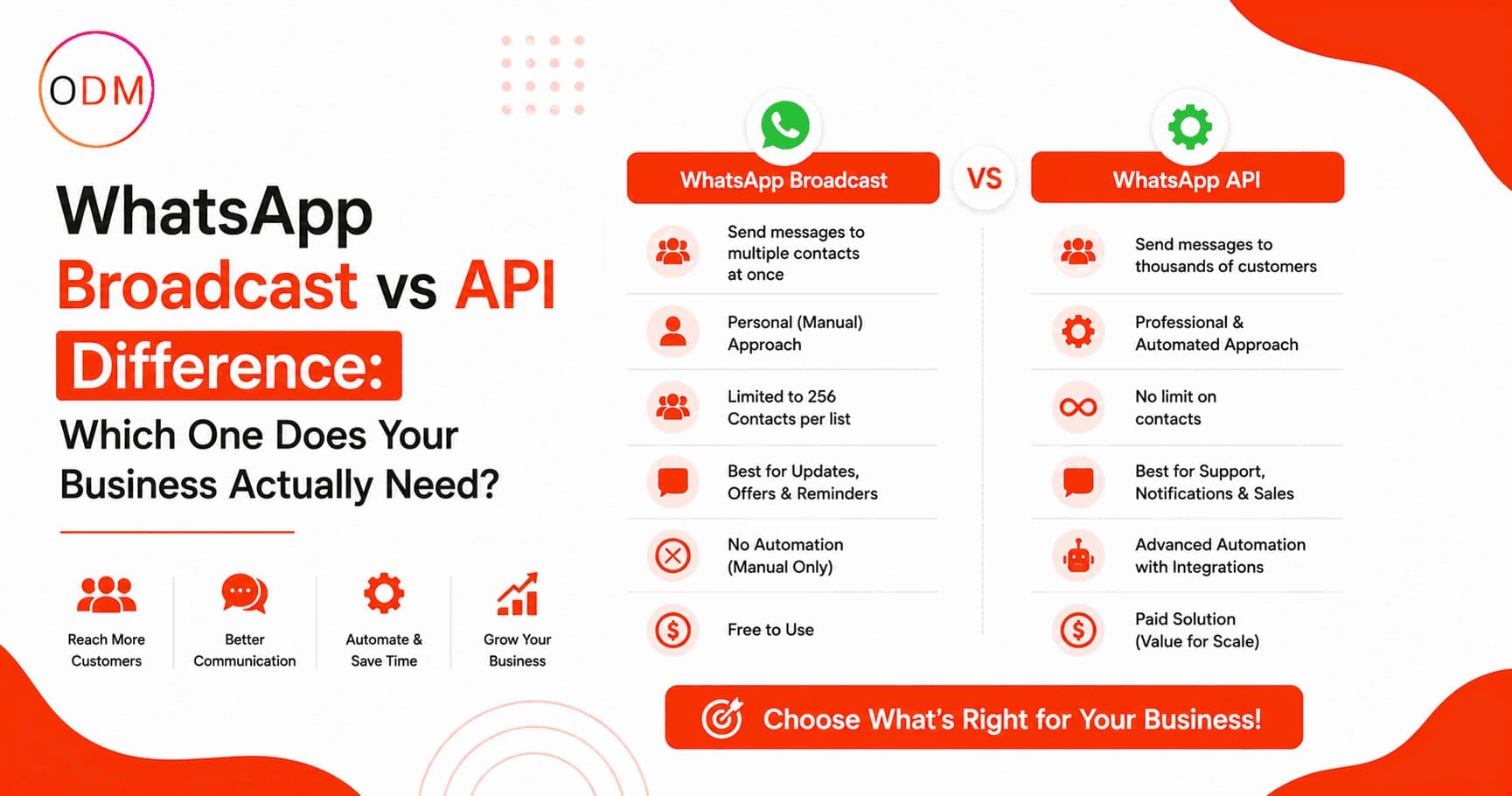
WhatsApp Broadcast vs API Difference: A Direct Comparison
This is the clearest way to understand the whatsapp broadcast vs api difference side by side.
Audience Limit Broadcasting caps at 256 contacts per list. The API supports thousands of contacts per campaign with no hard cap on recipients (based on business tier and opt-in status).
Recipient Requirement With Broadcasting, the recipient must have your number saved in their phone. With the API, no such requirement exists as long as the contact has opted in to receive messages.
Automation Broadcasting has zero automation. The API supports full chatbot flows, trigger-based messages, drip campaigns, and auto-replies.
Analytics Broadcasting offers no reporting. The API gives you delivery rates, read rates, link clicks, and response tracking depending on the platform used.
Template Approval The API requires Meta-approved message templates for initiating conversations. Broadcasting has no such requirement but also has no way to track whether your message worked.
Cost Broadcasting is free (within the app). The API involves per-conversation charges from Meta, plus platform or agency fees.
This is exactly the kind of whatsapp bulk messaging options decision that determines whether your campaigns produce results or just disappear into inboxes.
How Does WhatsApp API Messaging Actually Work Step by Step?
For businesses exploring the API for the first time, here is a clear picture of how it operates:
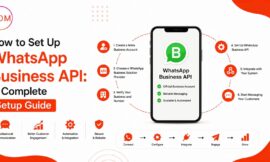
- Apply for API access through Meta’s Business Manager or through a registered BSP.
- Verify your business with Meta, including Facebook Business Manager verification.
- Get your WhatsApp Business Account (WABA) approved.
- Choose a platform or BSP to manage your messaging interface.
- Create and submit message templates for Meta approval (typically takes 24 to 48 hours).
- Build your opted-in contact list through website forms, ads, or customer onboarding flows.
- Set up automation flows, or send manual broadcast campaigns through your platform dashboard.
- Monitor results through built-in analytics or connected CRM tools.
This process is more involved than hitting “Broadcast” in the app, which is why many businesses work with a whatsapp marketing setup service to get it right the first time.
If your business is at the stage where you are weighing up whatsapp bulk messaging options seriously, getting the API set up correctly from the start saves a lot of rework later.
Real Business Scenario: When Broadcasting Stops Being Enough
Consider a clothing brand based in Delhi that started with WhatsApp Broadcasting. They had 200 loyal customers saved in their business phone. Every time they launched a new collection, they sent a broadcast. It worked well initially.
Then their customer base grew to 3,000 people. They could no longer manage multiple broadcast lists manually. Customers were responding to broadcasts and getting slow replies because there was no automation. Abandoned cart follow-ups had to be done manually. Offers expired before they could even send them out.
They switched to the WhatsApp Business API through a platform connected to their e-commerce store. Within 60 days, they had automated cart recovery messages, order status updates, and a segmented broadcast system that could reach all 3,000 customers in minutes.
The whatsapp broadcast vs api difference for them was not just technical. It was the difference between a tool they had outgrown and a system built for where their business was going.
What Are the Different WhatsApp Bulk Messaging Options Available in 2026?
Understanding whatsapp bulk messaging options helps you pick the right approach for your goals and budget.
Option 1: WhatsApp Business App Broadcasting Free, easy, limited to 256 contacts, no automation. Good for very small businesses with a simple contact list.
Option 2: WhatsApp Business API via a BSP Platform Scalable, automated, trackable. Requires setup, template approval, and a monthly platform cost. Best for growing businesses.
Option 3: WhatsApp API via Direct Integration For businesses with a tech team. You build your own interface on top of the API. Full control, higher development cost.
Option 4: WhatsApp API via a Full-Service Agency You hand over the setup, template creation, audience management, and campaign execution to an expert team. This is where a whatsapp bulk messaging agency earns its value for businesses that do not have in-house marketing resources.
Each of these whatsapp bulk messaging options suits a different stage of business growth. Choosing incorrectly means paying for features you cannot use, or staying limited when you need to scale.
Is Your Current WhatsApp Setup Actually Working for Your Business?
Take a moment to honestly assess where you stand right now:
- Can you send a campaign to more than 500 contacts today without manually splitting lists?
- Do you know the delivery rate and read rate of your last WhatsApp campaign?
- Are customer enquiries from WhatsApp being handled automatically or all manually?
- Do you have opt-in records for your WhatsApp contact list?
If the answer to most of these is no, your current setup is likely holding back your marketing results. A proper whatsapp marketing setup service does not just connect you to an API. It builds the foundation: opt-in flows, approved templates, automation sequences, and performance tracking.
A good whatsapp bulk messaging agency will audit your current situation before recommending anything. That audit alone can save significant budget by identifying what is actually needed versus what sounds good on paper.
Ready to Stop Guessing and Start Getting Real Results from WhatsApp?
Most businesses lose weeks (sometimes months) trying to figure out WhatsApp API setup, template approvals, and campaign structure on their own. The technical steps are manageable, but the real cost is in the mistakes: unapproved templates, non-compliant contact lists, or the wrong platform choice that locks you in.
Online Dot Marketing works as a dedicated whatsapp marketing setup service and whatsapp bulk messaging agency for businesses that want to run WhatsApp campaigns correctly from day one.
Whether you are moving from broadcasting to the API, setting up your first automated campaign, or trying to understand why your current WhatsApp marketing is not producing enquiries, the team at Online Dot Marketing can give you a clear picture of what needs to happen and how to get there.
FAQ: WhatsApp Broadcasting vs WhatsApp Business API
1. What is the main whatsapp broadcast vs api difference in simple terms?
WhatsApp Broadcasting is a free, limited feature inside the app that sends messages to up to 256 saved contacts. The WhatsApp Business API is a paid, scalable solution that supports automation, analytics, large audience reach, and integration with other business tools.
2. Can I use the WhatsApp Business API without a developer?
Yes, you can. Many Business Solution Provider platforms offer no-code dashboards for managing the API. A whatsapp marketing setup service or whatsapp bulk messaging agency typically provides the platform access and handles the technical setup on your behalf.
3. Does the WhatsApp Business API require contacts to save my number?
No, it does not. As long as a contact has opted in to receive messages from your business, the API can send to them regardless of whether your number is saved. This is one of the biggest advantages over standard broadcasting.
4. How much does the WhatsApp Business API cost in 2026?
Meta charges per conversation rather than per message. Rates vary by country and conversation type (marketing, utility, authentication, service). Platform or agency fees are additional. A whatsapp bulk messaging agency can provide a cost estimate based on your volume and target audience.
5. What are the best whatsapp bulk messaging options for a mid-size business?
For a mid-size business, the API through a BSP platform is the most practical option. It gives you scale, automation, and reporting without requiring a full development team. Partnering with a whatsapp bulk messaging agency speeds up the setup and ensures compliance with Meta’s policies.
6. How long does WhatsApp API setup take with a professional service?
With a reliable whatsapp marketing setup service, the full setup including business verification, API access, template approval, and first campaign launch typically takes between 7 and 14 business days, depending on how quickly Meta processes your verification documents.