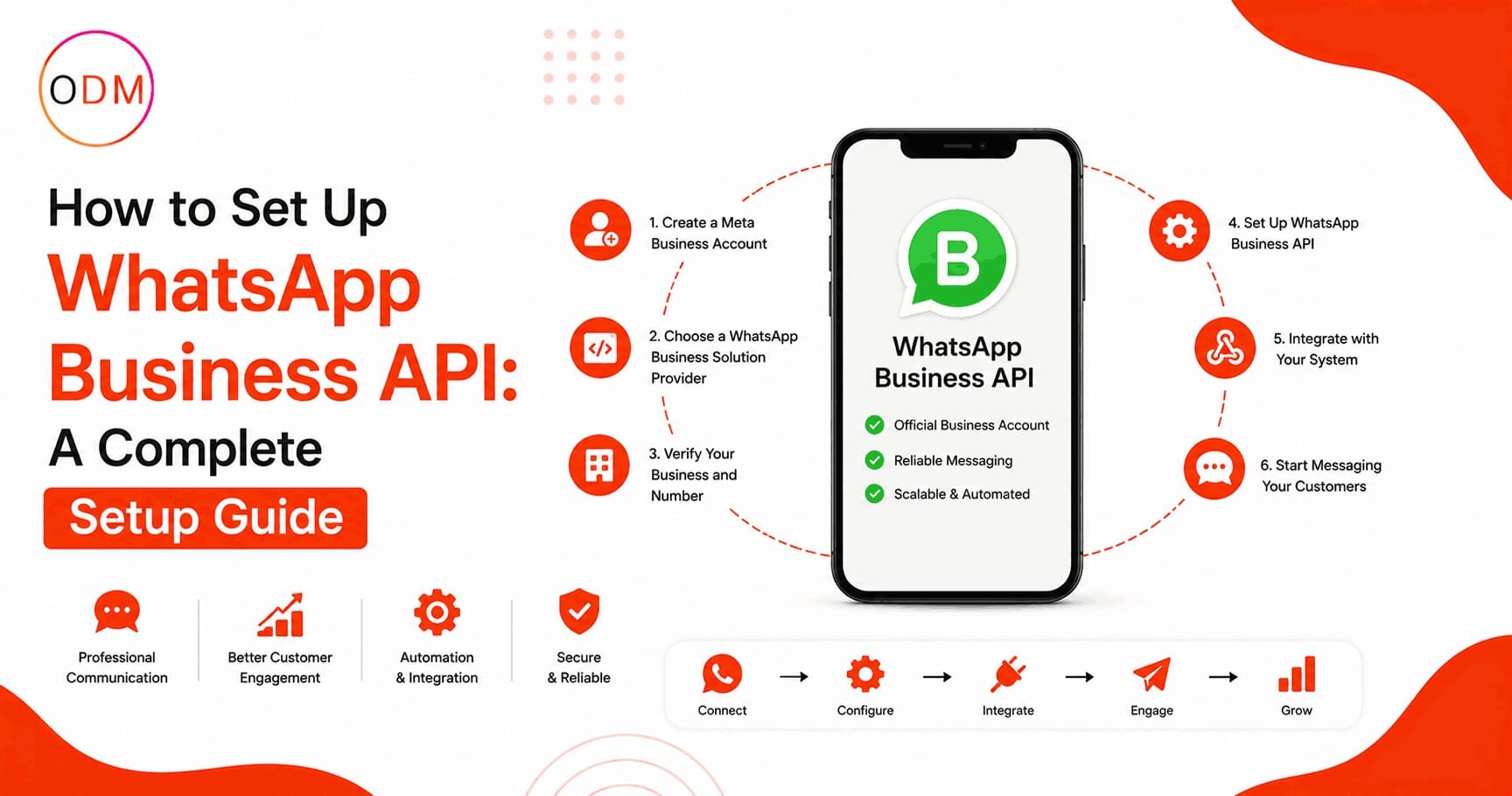
WhatsApp has over 2 billion active users globally, and businesses that are not using it for direct customer communication are already behind. If you have been trying to figure out how to use whatsapp api for marketing but keep running into technical roadblocks, confusing documentation, or unclear onboarding steps, you are not alone. The WhatsApp Business API is not as straightforward as downloading an app. Getting it right requires choosing the right access method, verifying your business, setting up messaging templates, and connecting it to your CRM or automation platform. This whatsapp business api setup guide walks you through every step so you can start sending messages that actually reach your customers.
What is WhatsApp Business API and How is it Different from the Regular App?
WhatsApp Business API is a backend messaging solution built for medium to large businesses. Unlike the free WhatsApp Business app, the API does not have its own interface. You access it through a Business Solution Provider (BSP) or by applying directly through Meta.
The API allows you to send automated messages, bulk notifications, transactional alerts, and marketing campaigns at scale. It also supports two-way conversations, chatbots, and CRM integrations.
The regular WhatsApp Business app limits you to one device and manual messaging. The API removes those limits entirely.
What Are the Requirements Before You Start the WhatsApp API Setup?
Before jumping into the technical setup, make sure you meet these prerequisites:
- A registered business with a valid website
- A Facebook Business Manager account (verified)
- A phone number that is not currently linked to any WhatsApp account
- A Meta-approved Business Solution Provider (BSP) or direct API access through Meta
- Approved message templates for outbound marketing
If your business is in a restricted category such as firearms, gambling, or adult content, Meta will not approve your account regardless of how complete your setup is.
Step-by-Step WhatsApp Business API Setup Process
This is the exact process used to get a WhatsApp API account live. Follow these steps in order.
Step 1: Create or Verify Your Facebook Business Manager Account
Go to business.facebook.com and either create a new account or verify your existing one. You need to submit your business name, address, and website. Meta will review this within 1 to 5 business days.
Step 2: Choose a Business Solution Provider or Go Direct
You have two options here. You can either go through a BSP (like Twilio, 360Dialog, Wati, or Interakt) or apply for direct API access through Meta’s Cloud API.
For most businesses, going through a BSP is faster and easier. They handle the infrastructure, compliance, and often provide a dashboard for managing conversations.
If you are running complex campaigns or need deep customisation, direct API access gives you more control.
Step 3: Register Your Phone Number
This is one of the most misunderstood steps. Your phone number must be new to WhatsApp. If it was ever linked to a personal or business WhatsApp account, you need to delete that account first and wait 30 days before using the number for the API.
During registration, Meta will send a verification code via SMS or voice call to confirm ownership.
Step 4: Create and Submit Message Templates
You cannot send outbound marketing messages without pre-approved templates. Templates must be submitted through Meta’s Business Manager and follow specific formatting rules.
Your template needs a clear category (marketing, utility, or authentication), a message body with optional variables like {{name}} or {{order_id}}, and no spammy or misleading content.
Approval usually takes a few hours, but complex templates can take up to 24 hours.
Step 5: Set Up Webhooks and Integrate Your CRM
Once your number is active and templates are approved, you need to configure webhooks so that incoming messages are captured and routed to your team or chatbot system.
Most CRMs like HubSpot, Zoho, and Salesforce have native or third-party WhatsApp integrations. Your BSP will typically provide documentation for this step.
Step 6: Test Your Setup Before Going Live
Send test messages to your own number and a few internal contacts. Check that template variables are populating correctly, that replies are being received in your CRM, and that your opt-in flow is working as expected.
Do not go live without testing. A broken variable in a bulk campaign can send thousands of malformed messages in minutes.
How to Use WhatsApp API for Marketing: Campaigns That Actually Work
Now that your setup is complete, the real question is how to use whatsapp api for marketing in a way that generates results rather than complaints.
Broadcast Campaigns With Permission-Based Lists
WhatsApp is strict about consent. You can only send marketing messages to users who have explicitly opted in. Build your opt-in list through website forms, QR codes, in-store sign-ups, or social media ads.
Once you have a verified opt-in list, you can send product launches, limited-time offers, cart abandonment reminders, and personalised promotions.
Automated Drip Sequences
Many businesses use the API to build multi-step messaging sequences similar to email automation. A new lead opts in, receives a welcome message, then gets follow-up messages over the next few days based on their behaviour.
This is one of the most effective ways of how to use whatsapp api for marketing because it mirrors what email automation does, but with open rates that regularly hit 90% or above.
Transactional Notifications With Upsell Opportunities
Order confirmations, shipping updates, and appointment reminders are classified as utility messages. You can embed light marketing content within these, such as a discount code for the customer’s next purchase or a link to a related product.
A Real-World Example: How a D2C Brand Used WhatsApp API to Recover Abandoned Carts
Consider a direct-to-consumer skincare brand that was losing roughly 65% of shoppers at the checkout stage. They implemented the WhatsApp API with a BSP, built an abandoned cart sequence with three messages spaced 1 hour, 6 hours, and 24 hours apart, and offered a 10% discount in the final message.
Within 60 days, they recovered 22% of abandoned carts through WhatsApp alone. The same sequence running through email recovered only 8%.
The messages felt personal because they used the customer’s name and the specific product left in the cart. That level of personalisation, delivered through how to use whatsapp api for marketing effectively, is what separates results-driven campaigns from generic blasts.
Is Your Current Setup Ready for WhatsApp Marketing at Scale?
Ask yourself honestly: Do you have a clean opt-in list? Are your message templates approved and tested? Do you have a system in place to handle replies from customers who respond to your campaigns?
Many businesses set up the API and then realise they have no process for managing two-way conversations. WhatsApp is not a one-way broadcast channel. When customers reply, someone or something needs to respond promptly.
This is one of the most common gaps we see at Online Dot Marketing. If you are unsure where your setup stands, getting a professional audit from a qualified whatsapp marketing agency can save you weeks of trial and error. You can speak with the team directly at https://onlinedotmarketing.com/contact-us.
What Does a WhatsApp API Setup Service Actually Include?
A professional whatsapp api setup service goes beyond just getting your account approved. Here is what a full-service setup typically covers:
- Facebook Business Manager verification and setup
- BSP selection and account registration
- Phone number registration and verification
- Message template creation and submission for approval
- Webhook configuration and CRM integration
- Opt-in flow setup (website forms, QR codes, ads)
- Chatbot or automated reply configuration
- Campaign testing and quality assurance
- Staff training on managing conversations
- Ongoing compliance monitoring
A whatsapp api setup service provider handles all of this so your team does not have to spend weeks learning Meta’s documentation from scratch.
If you are comparing providers, look for a whatsapp api setup service that includes post-launch support. The first 30 days after going live are when most technical issues surface.
Why Work With a WhatsApp Marketing Agency Instead of DIY?
Setting up the API is one thing. Running profitable campaigns consistently is another.
A dedicated whatsapp marketing agency brings campaign strategy, copywriting, compliance knowledge, and technical expertise under one roof. Instead of learning everything from scratch and making expensive mistakes, you get a team that has already run hundreds of WhatsApp campaigns across different industries.
A good whatsapp marketing agency will also keep you updated on Meta’s changing policies, new features like WhatsApp Flows, and shifts in platform behaviour that affect your deliverability.
Online Dot Marketing operates as a full-service whatsapp marketing agency with experience across e-commerce, real estate, education, healthcare, and retail. The team manages everything from initial whatsapp api setup service to ongoing campaign management.
How Much Does It Cost to Set Up and Run WhatsApp Business API?
Costs vary depending on the BSP you choose and the volume of messages you send. Here is a general breakdown:
Meta charges per conversation, not per message. A conversation window is 24 hours and all messages within that window count as one conversation.
As of 2026, Meta’s pricing is based on conversation category (marketing, utility, service, authentication) and varies by country. India, for example, has lower rates than the United States or UK.
BSP fees are separate and usually include a monthly platform fee plus per-message or per-conversation charges.
A professional whatsapp api setup service typically has a one-time setup fee that covers account registration, template creation, and integration work.
Ready to Stop Guessing and Start Getting Results From WhatsApp?
Setting up and running WhatsApp Business API is a multi-step process that touches your technical infrastructure, legal compliance, CRM systems, and marketing strategy all at once.
Most businesses that try to manage this alone spend months on trial and error before getting their first campaign live. And even then, without proper strategy, the results often fall short of what the channel is capable of delivering.
Online Dot Marketing is a results-focused whatsapp marketing agency and whatsapp api setup service provider that handles the full setup process for you, from Meta verification to your first live campaign.
Whether you are starting from scratch or already have an account that is not performing, the team at Online Dot Marketing can audit your current situation, fix what is broken, and build a WhatsApp marketing system that consistently drives enquiries and sales.
FAQ: WhatsApp Business API for Marketing
Q1: What is the difference between WhatsApp Business App and WhatsApp Business API?
The WhatsApp Business App is a free mobile application for small businesses with basic features and manual messaging. The WhatsApp Business API is a developer-level solution for larger businesses that supports automation, CRM integration, bulk messaging, and multi-agent team access at scale.
Q2: How long does it take to get WhatsApp Business API approved?
The full whatsapp business api setup guide process typically takes 3 to 7 business days. Facebook Business Manager verification takes 1 to 5 days. Phone number registration and template approval can happen within 24 hours once verification is complete and all documents are correctly submitted.
Q3: Can I send bulk marketing messages using WhatsApp API?
Yes, but only to users who have given explicit opt-in consent to receive messages from your business. Sending marketing messages to non-opted-in users violates Meta’s policy and can result in your number being banned permanently without appeal or refund.
Q4: Do I need a BSP or can I access the API directly?
You can use Meta’s Cloud API directly, which is free at the infrastructure level. However, most businesses benefit from a BSP because it provides a ready-made dashboard, support team, and simpler integration tools. A whatsapp api setup service will help you choose the right option.
Q5: What types of messages can I send through WhatsApp Business API?
You can send marketing promotions, transactional notifications like order updates, authentication messages such as OTPs, and utility messages like appointment reminders. All outbound messages outside of a 24-hour customer-initiated window require pre-approved templates submitted through Meta.
Q6: How does a whatsapp marketing agency help with campaign performance?
A whatsapp marketing agency handles strategy, template copywriting, audience segmentation, A/B testing, and performance analysis. They also manage compliance, reduce the risk of account bans, and continuously optimise campaigns based on real data from previous campaigns across multiple industries.