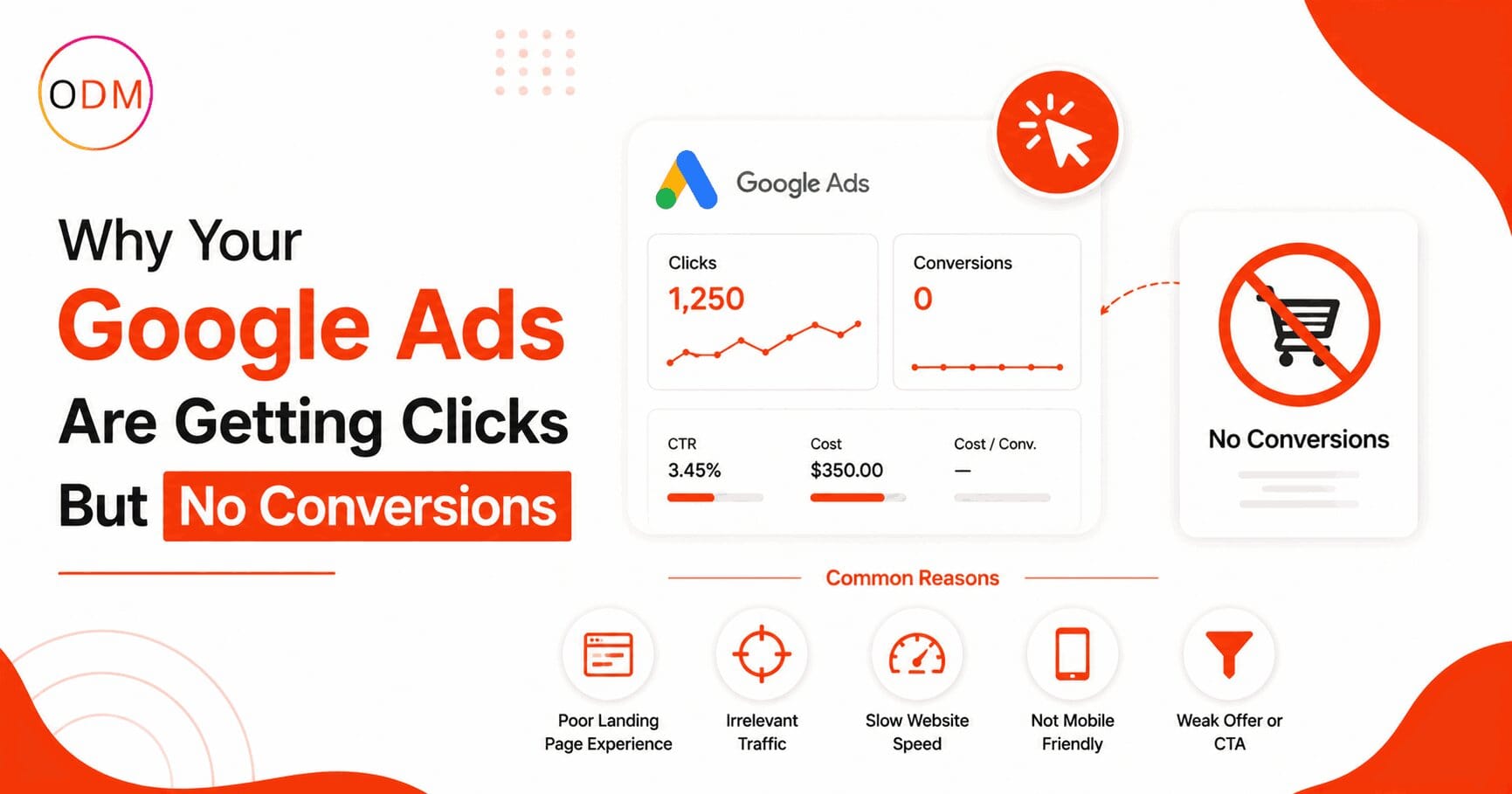
You are spending real money on Google Ads, the clicks are coming in, and still your enquiries or sales dashboard stays empty. If you are facing Google ads clicks but no conversions, you are not alone and the problem is almost always fixable once you know where to look.
The honest answer to why this happens: clicking an ad and completing a purchase or contact form are two entirely different decisions. A user clicks when the ad copy catches their attention. They convert only when every step after the click, from the landing page to the form, earns their trust and matches what they came for. When any one part of that chain breaks, the money you spent on that click disappears. This guide walks through every reason this happens and what to do about it.
What Does It Actually Mean When Google Ads Gets Clicks But No Conversions?
When you see Google ads clicks but no conversions in your account, it means users are finding your ads relevant enough to click, but something between the click and the desired action is stopping them from going further.
Google ads clicks but no conversions is not a campaign volume problem. You do not need more clicks. You need the right clicks to reach the right page with the right message at the right moment. Getting that alignment right is precisely why Google ads not converting is one of the most common complaints among businesses running paid search in India and globally.
The 6 Real Reasons Why Google Ads Not Converting (And What to Do)
1. Your Conversion Tracking Is Broken or Missing
This is the most overlooked cause. If your Google tag is not installed correctly, or if it fires on the wrong page, your account shows zero conversions even when real ones are happening. The opposite is also true: a misconfigured tag can fire multiple times for a single action, inflating your numbers and sending the algorithm in the wrong direction.
Check these immediately:
- Open Google Tag Assistant and verify your conversion tag fires on the correct confirmation page
- Link Google Analytics 4 with your Google Ads account
- Complete a test conversion yourself and confirm it registers in the account within 24 hours
If your account shows a healthy click-through rate but zero conversions recorded, broken tracking is the first place to investigate.
2. Your Landing Page Does Not Match Your Ad Promise
One of the clearest reasons for why Google ads not converting is a disconnect between the ad and the page it sends users to. If your ad says “Get a Free Website Audit” and your landing page talks about your general digital marketing services, users feel misled and they leave.
Message match is non-negotiable. The headline on your landing page should reflect the specific offer in your ad. The visual hierarchy, the call to action, and even the tone should continue exactly what the ad started.
Ask yourself this: if you click your own ad with no context, does the landing page make it immediately obvious what to do next? If the answer is no, you have found a major reason for your Google ads clicks but no conversions problem.
3. You Are Targeting the Wrong Keywords (Or Using the Wrong Match Types)
Broad match keywords without a strong negative keyword list are one of the fastest ways to burn through budget with no results. Google will match your ad to searches that are tangentially related to your keywords, attracting users who have no intention of buying or enquiring.
A business selling accounting software in Delhi should not be appearing for searches like “accounting homework help” or “free accounting courses.” Without negative keywords blocking these irrelevant terms, every click from those searches costs money and produces nothing.
The fix:
- Go to your Search Terms Report in Google Ads and audit every query triggering your ads
- Add irrelevant terms as negative keywords immediately
- Switch high-spend broad match keywords to phrase match or exact match where possible
- Build tightly themed ad groups where each group targets a specific intent
This structural discipline is exactly why businesses choose to hire Google ads expert India professionals rather than managing campaigns in-house without the technical background.
4. Your Bidding Strategy Does Not Match Your Conversion Volume
Smart bidding strategies like Target CPA or Maximise Conversions need data to work. Google recommends a minimum of 30 to 50 conversions per month per campaign before these strategies can optimise reliably.
If your campaign is new or low-volume and you are running Target CPA bidding, the algorithm is essentially guessing. It has no meaningful signal to learn from, so it either overspends chasing unlikely conversions or underspends in fear of exceeding the target.
When conversion volume is low, run Maximise Clicks first to gather data. Once you have consistent conversion volume, transition to a conversion-focused smart bidding strategy.
5. Your Landing Page Has Trust and Friction Problems
Even when the message matches perfectly, a landing page with no trust signals will not convert. Users clicking paid search ads are evaluating your credibility in seconds. If they see no reviews, no phone number, no clear address, and no recognisable logo, many will simply close the tab.
Common friction points that cause Google ads not converting even when traffic quality is strong:
- Forms with too many fields (more than five fields typically lowers conversion rates significantly)
- No visible phone number or live chat option
- Page load time exceeding three seconds on mobile
- No customer testimonials, certifications, or trust badges visible above the fold
- A generic homepage used as the landing page instead of a dedicated campaign page
A dedicated landing page built for a specific ad group consistently outperforms generic service pages. If you are sending all your ad traffic to your homepage, that is almost certainly contributing to your Google ads clicks but no conversions problem.
6. You Are Targeting the Wrong Audience at the Wrong Stage
Not every person who clicks a Google ad is ready to buy. Someone searching “what is digital marketing” is in a research phase. Someone searching “hire digital marketing agency Delhi” is ready to act. These two users need completely different pages and offers.
Running one campaign for all stages of buyer intent leads to wasted spend and poor conversion rates. Segment your campaigns by intent. Informational queries may need a lead magnet or a free resource. Commercial and transactional queries need a direct, friction-free conversion page with a clear offer.
A Real Scenario: How One Wrong Setting Wasted Three Months of Budget
Consider a mid-sized education services company in Pune running Google Ads for an online certification course. They were spending approximately Rs. 1.2 lakh per month, receiving 800 to 900 clicks monthly, and recording zero conversions in their account.
After a proper audit, three problems were found. First, the conversion tracking tag was firing on the course catalogue page instead of the post-purchase confirmation page, so no real conversions were being recorded. Second, the campaign was running broad match for terms like “online certification” which was attracting students looking for free government certifications with no intent to pay. Third, the landing page had a 14-field registration form above the fold with no visible pricing or testimonials.
After fixing tracking, adding 60 negative keywords, reducing the form to four fields, and adding three student testimonials with a money-back guarantee badge, conversion rates reached 4.2 percent within six weeks. The budget stayed the same. The results changed entirely because the structural issues were addressed, not the ad spend.
This is exactly what a Google ads conversion optimisation agency does: finds and fixes what the dashboard does not show you upfront.
Step-by-Step: How to Diagnose Google Ads Clicks But No Conversions
Use this framework in sequence before making any campaign changes:
- Verify conversion tracking first. Use Google Tag Assistant to confirm your tag fires correctly on the right page. This step takes 20 minutes and can immediately explain everything.
- Check your Search Terms Report. Look at what actual queries are triggering your ads. Remove every irrelevant term as a negative keyword.
- Click your own ads. Experience the user journey from search to landing page. Time how long the page loads. Read the headline with fresh eyes. Check if the form is simple enough to complete in under two minutes.
- Review your Quality Scores. Any keyword scoring below five with meaningful spend is costing you more per click than it should and delivering weaker ad placements.
- Check mobile performance separately. If conversion rates on mobile are significantly lower than desktop, you have a mobile landing page or form usability issue.
- Audit your bid strategy against conversion volume. If you are running Target CPA with fewer than 30 monthly conversions, switch to Maximise Clicks temporarily to build data.
This six-step process resolves the majority of Google ads clicks but no conversions situations without needing to increase budget.
Is Your Google Ads Account Actually Structured to Convert?
Take a moment to honestly evaluate your current setup. Can you answer yes to all of the following?
- Does each ad group have a dedicated landing page built specifically for that group’s keywords?
- Are your negative keyword lists reviewed and updated at least every two weeks?
- Is your conversion tracking verified through a live test in the last 30 days?
- Does your Quality Score on primary keywords sit at seven or above?
- Are you segmenting campaigns by buyer intent, not just by service category?
If you answered no to two or more of these, your account has structural gaps that will continue to produce Google ads clicks but no conversions regardless of how much you spend. This is often the point where businesses in India decide to hire Google ads expert India specialists rather than continue troubleshooting without clear direction.
Still Seeing Google Ads Clicks But No Conversions? Let’s Find Out Exactly Why.
If your campaigns are spending consistently but not producing leads or sales, the problem is structural, not seasonal. Most businesses in India who experience Google ads clicks but no conversions for more than four to six weeks are dealing with multiple overlapping issues that are difficult to diagnose without a proper account-level audit.
At Online Dot Marketing, our team works specifically with businesses that are frustrated by wasted ad spend and poor ROI. As a dedicated Google ads conversion optimisation agency, we go through your account from tracking to targeting to landing page performance and identify exactly where your budget is leaking.
Whether you need a one-time audit or ongoing campaign management, we work with businesses across India and internationally to get paid search performing the way it should.
FAQ: Google Ads Clicks But No Conversions
Why am I getting Google ads clicks but no conversions at all?
The most common reasons for Google ads clicks but no conversions are broken conversion tracking, a poor landing page experience, keyword intent mismatch, or overly broad targeting. Start by verifying your tracking setup before assuming the issue is with the ads themselves.
How do I know if my Google Ads conversion tracking is broken?
Use Google Tag Assistant to test whether your tag fires on the correct thank-you or confirmation page. If the tag does not fire, or fires on the wrong page, your account records no conversions even when real purchases or form submissions occur.
What is a good conversion rate for Google Ads in India?
Average Google Ads conversion rates across industries range from two to five percent. Service-based businesses often achieve higher rates with well-structured campaigns. If your rate is below one percent with meaningful traffic volume, there is likely a structural issue to address.
Should I hire a Google ads expert India professional or manage ads in-house?
For businesses spending more than Rs. 50,000 monthly on Google Ads, the cost of mismanagement typically exceeds the cost of professional help. When you hire Google ads expert India professionals, you get structured campaigns, ongoing negative keyword management, and conversion tracking that actually works.
Does my landing page really affect Google Ads conversions that much?
Yes, significantly. The landing page is where conversions actually happen or fail. A slow, generic, or mismatched landing page can reduce your conversion rate by more than 60 percent. Every ad group should point to a page built specifically for its keywords and audience intent.
What does a Google ads conversion optimisation agency actually do?
A Google ads conversion optimisation agency audits your full account structure, fixes tracking, rebuilds landing pages for message match, manages negative keywords, improves Quality Scores, and aligns bidding strategies with your actual conversion data. The result is fewer wasted clicks and more revenue from the same or lower spend.
Can increasing my Google Ads budget fix low conversions?
No. Increasing budget on a campaign that is not converting only increases your losses at a faster rate. The structural issues causing low conversions must be fixed first. Budget increases are productive only after conversion rates are healthy and the account is optimised.